
For employers registered with the Human Resource Development Corporation (HRD Corp), paying the monthly HRD levy is an important part of maintaining compliance with Malaysia’s human resource development requirements.
If you are wondering how to pay HRD Corp, the process is generally completed through the HRD Corp e-TRiS system. Employers can make payment through several methods, including online banking via FPX, JomPAY and manual payment.
This guide explains the HRD Corp levy payment process, the payment deadline, available payment methods and what employers should do if a payment becomes overdue.
What Is the HRD Corp Levy?
The HRD Corp levy is a monthly contribution paid by registered employers to support employee training and skills development.
According to HRD Corp, employers with 10 or more Malaysian employees are generally required to register under the applicable PSMB Act requirements. Employers with 5 to 9 Malaysian employees may register voluntarily, subject to the applicable conditions.
For registered employers, the monthly levy is generally calculated based on employees’ monthly wages. HRD Corp currently states a levy rate of 1% for the mandatory category and 0.5% for the optional category.
The levy contributes towards the employer’s levy account, which can subsequently be used in accordance with HRD Corp’s training grant and claim mechanisms.
When Is the HRD Corp Levy Payment Due?
The HRD Corp levy is generally due by the 15th day of the following month.
For example:
- January levy → payment due by 15 February
- February levy → payment due by 15 March
- March levy → payment due by 15 April
HRD Corp’s employer guidance states that levy payments should be made by the 15th of each month for the applicable previous month’s contribution.
Employers should check HRD Corp announcements for any temporary changes to a payment deadline. For example, HRD Corp has previously extended a deadline because of a public holiday.
How to Pay HRD Corp Levy Through e-TRiS
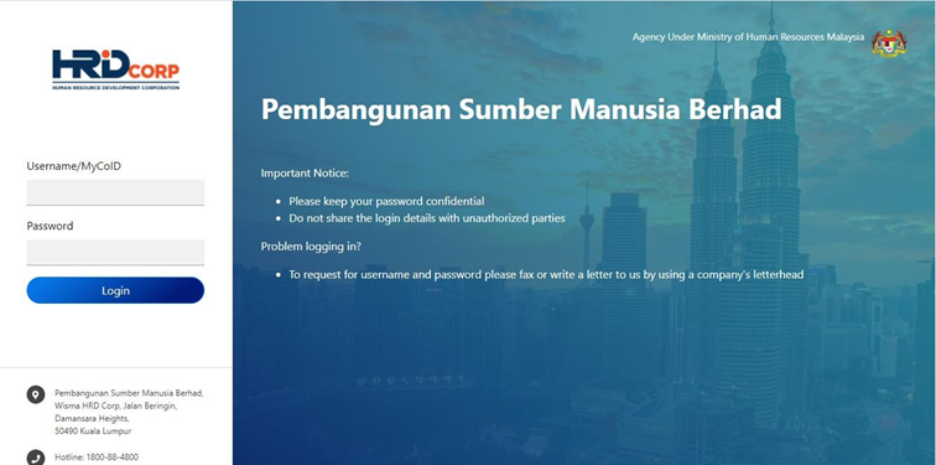
The HRD Corp levy payment process starts from the employer’s e-TRiS account.
Step 1: Log in to e-TRiS
Log in to your company’s HRD Corp e-TRiS account using the employer’s registered credentials.
Make sure you are using the appropriate employer account before proceeding with the levy payment.
Step 2: Go to the Levy Payment Section
According to HRD Corp’s levy payment instructions, navigate through:
Application → Levy → Form 2 e-Slip Form
You will then need to select the relevant payment type and levy month.
Step 3: Select the Payment Type
For a normal monthly payment made within the required period, select:
Payment Type: Levy
Then select the relevant month.
If you are paying an overdue amount, different payment types may apply, including Arrears or Interest, depending on the circumstances.
Step 4: Generate the Payment
After selecting the relevant levy month, continue through the e-TRiS process until the payment option is displayed.
HRD Corp provides several payment methods for employers.
HRD Corp Levy Payment Methods
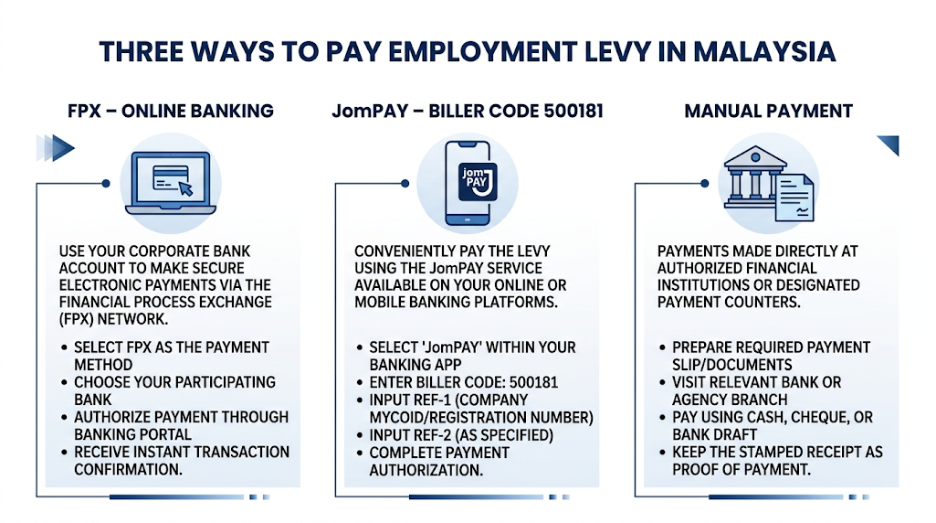
1. Online Payment via FPX
One of the convenient ways to pay the HRD Corp levy is through online banking using FPX.
HRD Corp’s payment guide provides an online payment option where employers select their participating corporate bank and complete the transaction through the bank’s online banking platform.
Depending on the available banking options, employers may select their company’s corporate banking platform and follow the bank’s payment instructions.
After completing the transaction, keep the payment confirmation or transaction record for your company’s records.
2. JomPAY

Employers can also make HRD Corp levy payments using JomPAY.
HRD Corp’s current levy payment guidance provides the following information:
Biller Code: 500181
For the reference number, employers should refer to the generated e-Slip.
Before making the payment, check the e-Slip carefully and ensure that the payment reference details are entered correctly.
3. Manual Payment
Manual payment is another option provided by HRD Corp.
The employer can generate the relevant e-Slip through e-TRiS and use it to make payment through the applicable manual payment channel.
HRD Corp also confirms that cheque and cash payments remain available through Public Bank branches under the applicable procedure.
Employers using manual payment should keep the payment slip and supporting documents for their records.
What Happens After Paying the HRD Corp Levy?
After completing the payment, employers should retain the relevant payment evidence.
HRD Corp’s employer journey explains that employers should:
- Confirm the monthly levy amount.
- Select the payment method.
- Make the payment.
- Upload proof of payment where required.
- Confirm and declare the payment.
- Monitor the levy balance through e-TRiS.
Keeping payment records is useful for accounting, compliance and future reference.
What If the HRD Corp Levy Payment Is Late?

Employers should avoid missing the monthly payment deadline.
HRD Corp identifies late levy payments as levy in arrears. Employers may also be required to pay interest on overdue amounts.
According to HRD Corp’s current levy payment guidance, interest on arrears is calculated at 10% per annum based on the amount in arrears and the number of days late, with a minimum interest amount of RM5.
The HRD Corp FAQ also states that failure to make payment within the stipulated timeline may result in enforcement consequences under the PSMB Act, including a fine of up to RM20,000, imprisonment of up to two years, or both upon conviction.
If a payment is already overdue, employers should check the amount shown in e-TRiS and follow HRD Corp’s procedure for arrears and interest payments.
What Is Form 3 for HRD Corp Levy Arrears?
For levy payments made after the stipulated payment period, HRD Corp states that employers are required to submit Form 3 to declare the actual levy amount.
The employer can then proceed with the applicable arrears payment through e-TRiS.
This is different from a normal current-month levy payment, so employers should select the correct payment type when using e-TRiS.
HRD Corp Levy Payment Checklist
Before completing your payment, use this simple checklist:
- Check the applicable levy month.
- Confirm the levy amount.
- Log in to the correct e-TRiS employer account.
- Generate the appropriate e-Slip.
- Select the correct payment type.
- Choose your preferred payment method.
- Check the payment reference details.
- Complete the transaction.
- Keep the payment confirmation or receipt.
- Upload or declare the payment in e-TRiS when required.
- Check the levy balance after payment.
Frequently Asked Questions About Paying HRD Corp
How do I pay HRD Corp levy?
You can pay the HRD Corp levy through the e-TRiS system. HRD Corp provides payment options including online payment through FPX, JomPAY and manual payment.
What is the HRD Corp JomPAY Biller Code?
The HRD Corp levy payment guidance lists Biller Code 500181. The relevant reference should be taken from the generated e-Slip.
When should I pay the HRD Corp levy?
The levy is generally payable by the 15th day of the following month. Employers should check HRD Corp announcements for any special deadline extensions.
What happens if I pay the HRD Corp levy late?
Late payments can be treated as levy arrears and may be subject to interest. HRD Corp’s current guidance states that interest is calculated at 10% per annum based on the amount in arrears and the number of days late, subject to a minimum interest amount of RM5.
Can I pay HRD Corp levy online?
Yes. HRD Corp provides an online payment option through FPX, subject to the available corporate banking options and payment process.
Can HRD Corp levy be paid through JomPAY?
Yes. HRD Corp’s levy payment guidance provides JomPAY as a payment method and lists Biller Code 500181. Employers should use the reference details provided on their generated e-Slip.
Conclusion
Knowing how to pay HRD Corp can help employers manage their monthly levy obligations more efficiently. The process is mainly handled through e-TRiS, where employers can generate the relevant e-Slip and choose a suitable payment method such as FPX, JomPAY or manual payment.
Employers should also remember the regular 15th-day payment deadline, retain payment records and check their e-TRiS account after making payment. If a payment is overdue, the employer should follow HRD Corp’s procedures for levy arrears and interest.
For the latest payment instructions, employers should always refer to the official HRD Corp guidance because payment procedures, deadlines and special exemptions may be updated.
Resources